
DUOS Researcher Onboarding
Role
UX/UI Designer
Client
DUOS at Broad Institute
Team
Product Manager
Frontline Support (CX liason)
1 Full-stack Engineer
External Stakeholders
NIH
Timeline
1 month
Challenge
DUOS is a platform that allows researchers to request access to federally restricted data. In order to receive dataset access permission, they need to complete a Data Access Request form (DAR).
Based on our analytics, a third of our Researchers were abandoning their DARs midway through the process. On our Researchers’ end, problems with the DAR process could halt progress on life-saving research. On the business end, our success as a platform depends on the number of monthly engaged users.
Our goal was to figure out the underlying cause of DAR abandonment. And then fix it.
Outcome and Impact
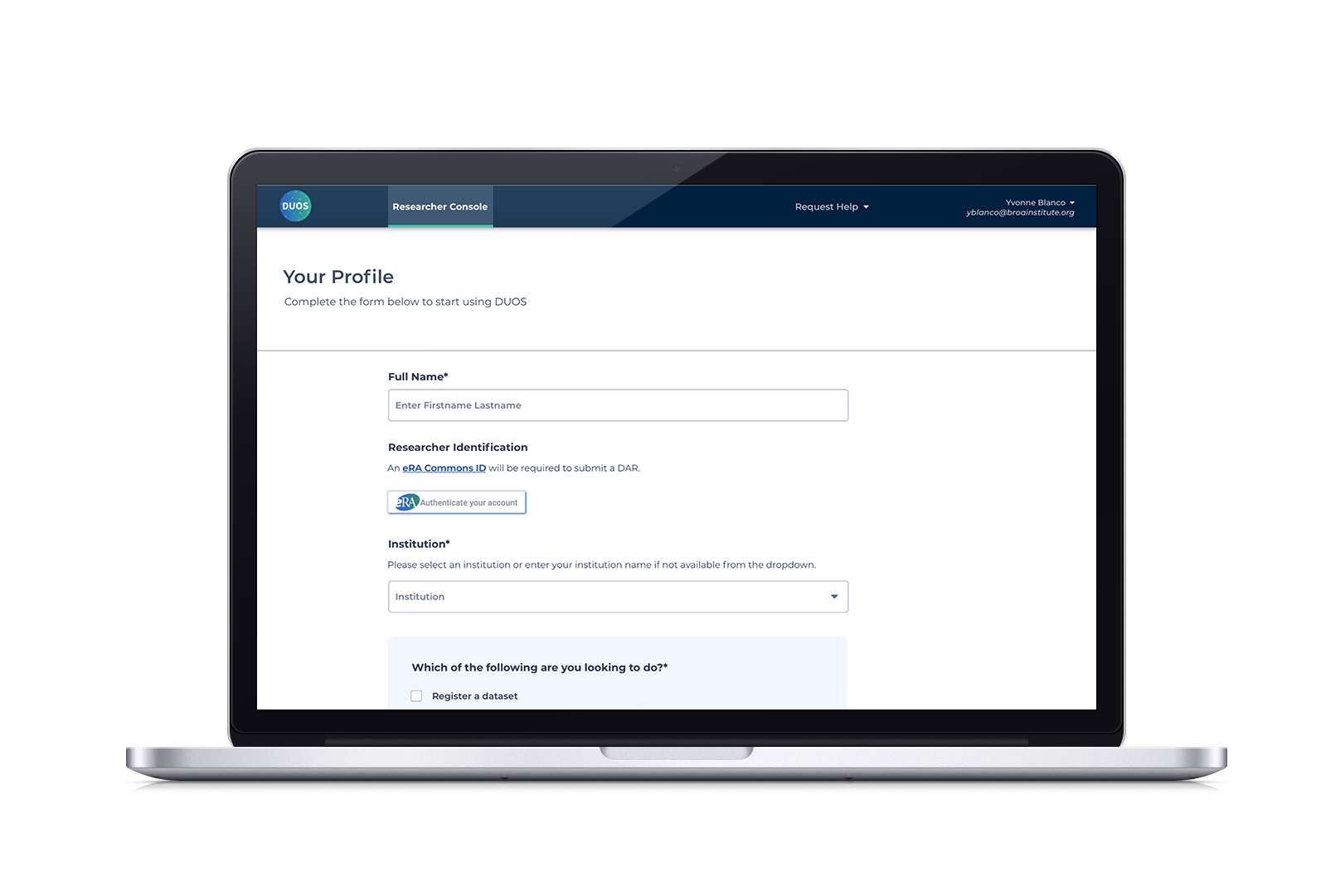
After conducting research and analyzing researchers’ workflows, I designed a simplified registration form, adding a section that helps our users identify what they hope to accomplish with DUOS. This triggers a new onboarding communication flow, solve our researcher’s pain points with:
Specialized onboarding
Rather than receiving a generic “Welcome to DUOS” follow-up, the use category would designate an onboarding email tailored to their needs. Researchers would get information specific to their DAR process, resources and tutorials, and who they would need to contact and when, before they start the process.
Reduced time spent seeking clarification
We also added a reminder at the top of the DAR form. Having everything you need before you start the process eliminates the need to contact Admins for crucial information or file help desk tickets.
Unexpected bonus
We reduced the amount of input boxes a researcher has to fill out after registration, so it takes less than a minute to start the onboarding process.
Six months after launching, completed DARs increased by 50% and tickets related to Signing Officials were reduced to 0, proving that these adjustments greatly reduced the confusion that led to DAR abandonment. The simplified design served as a template for other forms, impacting the overall design system for DUOS.
Process
This project centered around an evaluative process, initially reviewing the onboarding process, then performing a quantitative analysis of frequently asked “help” questions, and mapping the user flow to conduct a cybernetic analysis.
What does the current onboarding flow look like?
I held a flow mapping exercise with the DUOS product manager and our liaison from Frontline Support to figure out the steps in the current onboarding flow in order to understand what conditions led to this phenomenon (messy Miro top image).
We then reviewed frequently recurring help tickets. If they didn’t yield any “A-ha” insights, we’d shift to surveys and qualitative interviews. This way, we could move quickly and test possible solutions without spending too much time on research.
We noticed that a high percentage of those tickets revolved around Signing Officials, the person who gives the researcher the initial permission to seek access. I mapped out the process as a cybernetic loop (second cleaner diagram) and realized that our researchers didn’t know they had to identify a Signing Official and get this permission until they were in the second section of the DAR form.
How early can we introduce the Signing Official?
We now know that our Researcher had to stop the application process to find and contact their Signing Official, then wait for that approval. This creates a delay and forces them to start the process all over again.
After registration, the user fills out the Profile form. From here, we add a section that identifies how they plan to use DUOS. This triggers a tailored email to researchers that includes information on how to identify their Signing Official and what to expect with the DAR process.
However, the form requested a lot of information and adding a section would complicate an already full interface. I conferred with my engineers and product manager to see if there was a back-end solution. We decided on an adjustment to our API autofills this information directly from the eRA Commons and Institution IDs, reducing the number of input boxes from 20 to 4 fields!
Reflection
This project taught me not to fear simplicity. Often, we think that a design is better if it has multiple menus and layers, but the best experiences should feel effortless because all the heavy lifting is done behind the scenes. This project changed how I viewed engineers: I now bring them in early to the design process to help me identify functionalities that impact workflows.
I was moved to a different project after this improvement was launched, but if asked to reopen this door, I’d be curious to:
Explore assistive tech in order to further reduce steps in this process (can a Signing Official be automatically identified when filling out the profile form so users don’t have to wait for an email?)
Can we further leverage the API to pre-populate a DAR, thus reducing the time it takes to complete the form?