
Broad20
My Role
Design Lead and Mentor
Mentees
Junior UX Designer
Junior Engineer
Stakeholders
Broad Director of Communications
Broad Executive Leadership
Timeline
Aug 2024- Nov 2024 (4 months)
Challenge
One way of determining whether a research organization is successful is through the lens of scientific publications. Our challenge was to find data and extract patterns and trends to show the impact of Broad’s scientific efforts over the past 20 years. Our requirements were:
Craft an interactive, engaging story providing contextual information on how publication research relates to Broad’s mission of advancing science
Avoid unnecessary features that would give it the look and functionality of a tool, since this was framed as an editorial visualization
Function as a digital e-poster for symposium presentation and a desktop application
Bonus: Mentor two junior colleagues and guide them towards executing my vision as the design lead
Outcome
We created an interactive visualization microsite that told the story of Broad’s scientific growth through a guided, scrolly-telling format. Our users navigate through 10 story points about important research subjects, such as Genetics, Computational Biology, Cancer, and COVID-19. This shows the scale and depth of the research over time and displays contextual information on each subject, allowing users the option to reveal links to published papers by the Broad.
Process
Since this is an editorial project, our team had free reign to make decisions on how to display and animate this data with limited user input. Testing was done with a limited cohort and mainly focused on finding bugs. This is a standalone site with a realized end point, making this process linear.
How can we visually translate publication data?
Our visual inspiration came from a sample of DNA fragment base pairs viewed under electrophoresis. In the example we referenced, fragments that are larger in length have a darker and taller rectangle. We used this as an inspiration for visually encoding the data.
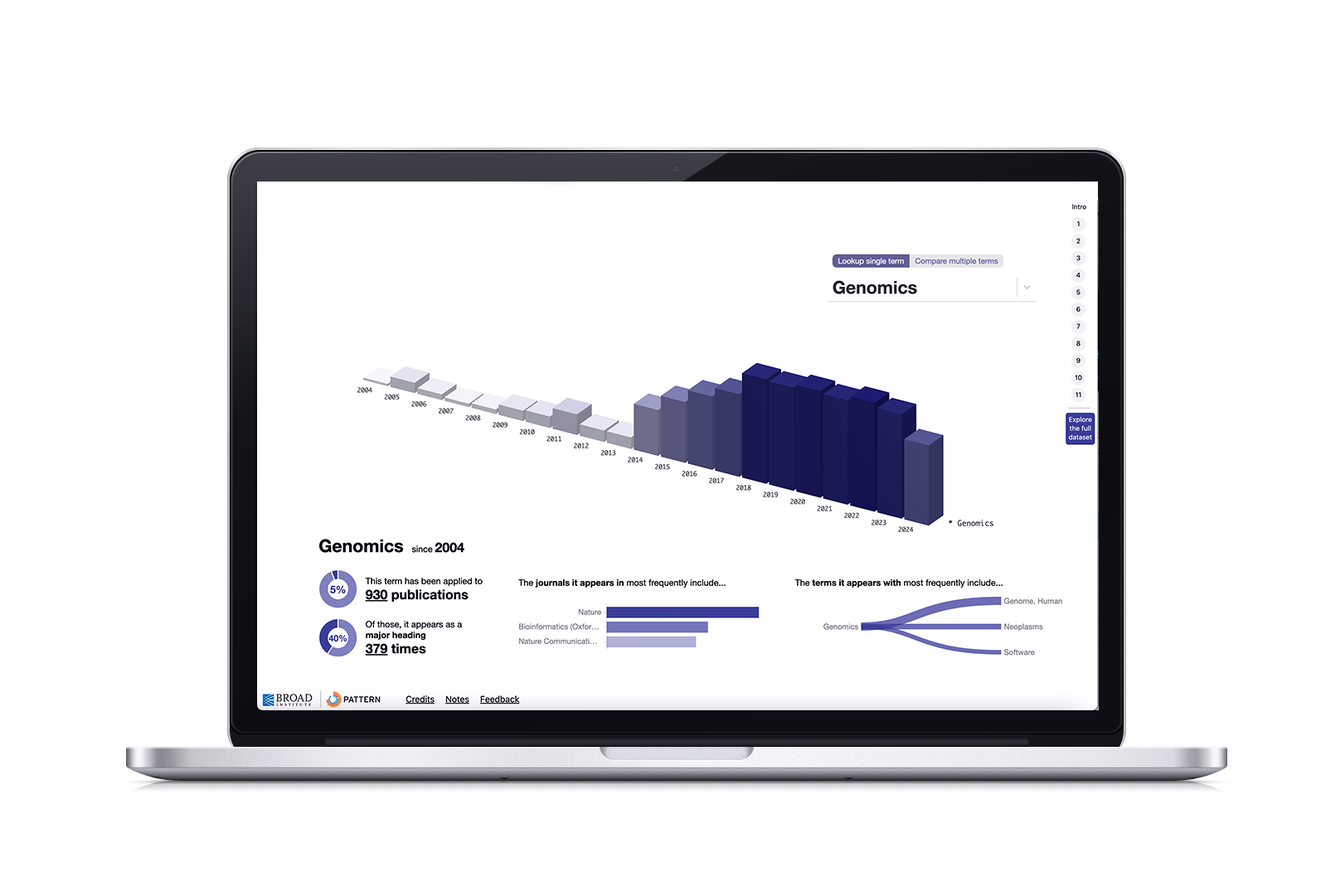
In our flat visualization, each row represents a Medical Subject Heading (MeSH) keyword. The intensity of each bar reflects the number of times a keyword appeared in Broad-authored scientific papers published in a given year. The darker the bar, the more that keyword appeared in papers from Broad scientists.
Data, but make it editorial
Using my stylesheet as a guide, our Director and Junior engineer cleaned the MeSH dataset and coded a few variations to explore. These initial coded prototypes had the story text in a floating box that scrolled off the page once a new point was engaged. The styling I provided gave it an editorial feel.
A three-dimensional view was discovered while we were all mobbing the code. While three-dimensional visualizations tend to be hard to navigate (don’t get me started on 3D pie charts), in an expository setting, this dimension can give a better idea of the number of times a term appeared through height.
Animations help condense data and alleviate legibility concerns
Since our dataset is HUGE, the entire visualization would have to be incredibly small to fit on a screen, therefore rendering it illegible. I proposed two steps: Show the entire visualization as part of a loading animation to help give users a sense of the scale, then zoom into the section that relates to the story point. I roughly storyboarded the animation by referencing static generated states of the visualization, which were then hard-coded.
Each story point would trigger refreshes loading animation, to remind users of the scale. A refined interactive visualization shows only the corresponding data for the subject, along with a text panel that provided a definition of the subject and links to corresponding papers.
Guiding my mentees on the main visualization design
The most difficult, yet rewarding, part of all this was taking a step back from creating everything design-related and guiding the Junior UX Designer and Junior Engineer on the design and layout for the main visualization. The easiest thing would be to design everything and give them a list of directions and tasks to complete.
But I was invested in helping them grow. I wanted both to emerge as stronger problem solvers, strengthen their resourcefulness, and strengthen their confidence in articulating design decisions.
We met biweekly to review prototypes and guide them to how to answer the questions they had. To build resourcefulness, I would answer questions with links to resources they could read and synthesize, or “what steps would you take to find the answer?” I asked “why” a lot. I conducted mock client presentation sessions to ease their nerves and provided thoughtful feedback. I treated them with respect and empathy.
“Growth is not always comfortable or straightforward, and can be really frustrating. But that’s how you know that you’re putting in the work to improve,” I often told them.
After six weeks of iterations, resources, 5 min analysis exercises, and “no question is a dumb question” sessions, they arrived at the final design, infographics layout, and the visualization control behaviors. And I improved my patience and trust in delegating work to others.
Refinement after testing
We tested the site internally by providing links to members from our Communications department and collecting their feedback. While overall positive, these two insights emerged:
Users wanted a direct link to the main visualization at the end; they didn’t always want to scroll through the entire story each time they wanted to view and compare data on one or more subjects.
Users wanted a way to sequentially navigate from one story point to another. These users were interested in a specific subject (such as Genomics or COVID) and didn’t care much for the rest.
Ultimately, we decided on adding Back and Next buttons to the main content, the ability to show and hide related publications, and a side menu that divided the site into story points with a direct link to the main visualization.
Launch and Reflection
Broad20 was launched on 12/15/24. Reactions have been incredibly positive; the most comments were versions of “This is so cool!” and “Wow, I didn’t realize the scale and breadth of research at the Broad!” Given that this a linear process, we won’t be reassessing and iterating. If we were to reopen this project and create a 2.0, I would want to explore:
Improving the UI by anchoring the navigation buttons with a divider, redesigning the control panel, and updating the color palette to better incorporate the ochre
Implementing a funnel strategy and connecting this site to other bespoke, Broad-specific sites
The Pattern team will be using this project as an example in order to propose and structure future projects, and develop SOPs for generative visualizations and bespoke sites.